HTTP Server is a small Java library I developed for serving web resources from an application. The project explores a way to add HTTP communication to programs running on the JVM.
Prepare the desktop project
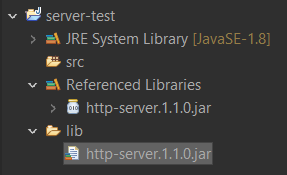
The original example uses Eclipse. First, add the library’s JAR to the lib directory and register it on the project’s build path.
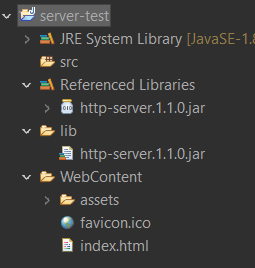
Next, create a WebContent directory for the files to serve. The relationship between that directory and the registered contexts determines which resource a request receives.
Register the handler and start the server
This snippet shows the project’s API: it sets the listening address, creates the handler, configures resources, and registers index.html as the initial document.
String host = "127.0.0.1";
int port = 8080;

HttpServer httpServer = new HttpServerImpl(host, port);
WebHandler webHandler = new WebHandler() {
    @Override
    public HttpResponse handleQuery(HttpRequest httpRequest) {
        // Handle GET and POST requests
        // containing parameters, for example from a form
        return HttpResponse.build(Status.NOT_FOUND);
    }

    @Override
    public InputStream toStream(File file) throws Exception {
        return new FileInputStream(file); // File to stream
    }
};
// Set the web resource directory
webHandler.setContentFolder("WebContent");
// Register the initial context
webHandler.getIndexMap().put("/", "/index.html");
// Register webHandler as the HTTP listener
httpServer.setHttpListener(webHandler);
// Start the server
httpServer.connect();

try (Scanner scanner = new Scanner(System.in)) {
    System.out.println("Press Enter to exit...");
    scanner.nextLine();
}
With the example server running, open http://127.0.0.1:8080. The parameter-request handler returns a 404 response until the application’s own logic is added.
Adapt resource loading
The original project also demonstrates an Android adaptation. The main difference in this example is how WebContent is loaded: instead of reading a disk file directly, it resolves a resource through the class loader.
@Override
public InputStream toStream(File file) throws Exception {
  ClassLoader classLoader = Thread.currentThread().getContextClassLoader();
  String path = file.getPath();
  return classLoader.getResourceAsStream(path);
}
Declare network permissions
The Android example declares these permissions in AndroidManifest.xml. A complete integration needs to match the packaging and lifecycle of the application using it.
<uses-permission android:name="android.permission.INTERNET" />
<uses-permission android:name="android.permission.ACCESS_NETWORK_STATE" />
The library is written in Java without dependencies on other projects. These snippets document its original API and can be read alongside the repository’s implementation.